In a 2023 study summarized on Wikipedia’s Pomodoro Technique entry (consulted September 27, 2026), 25 students worked in fixed Pomodoro intervals while 35 took breaks whenever they felt like it. The self-paced group picked longer stretches, and those longer stretches came with more fatigue and less concentration. Task completion was the same in both groups. The takeaway for a freelancer is narrower than “use a timer”: a structure you don’t have to negotiate with yourself costs less energy than one you do.
That is also why most “best focus app” lists miss the point. They rank timers by features. A freelancer rarely lacks a timer. What goes wrong is more specific, and each problem needs a different kind of tool. This guide sorts five apps by the problem they actually fix, with prices checked on each vendor’s own pricing page on September 27, 2026.
Three ways a freelance workday leaks
Watch a solo workday closely and the lost time usually falls into one of three patterns:
- The late start. Nobody is waiting for you at 9:00, so the first real work begins at 10:40. The problem is not distraction; it is the absence of anyone expecting you.
- The tab drift. You start the proposal, check one client email, and forty minutes later you are reading a thread you didn’t need. The problem is access.
- The lost thread. You worked all day but can’t say what the hours went to, which hurts twice: once when you estimate the next project and again when you invoice this one.
A timer alone only helps with the third one, and only if it records what each session was for. For the first you need accountability; for the second you need a blocker. Buying the wrong category is the most common way people end up with three unused focus subscriptions.
The five apps on one table
| App | Problem it fixes | Free tier | Paid price (checked Sep 27, 2026) | Platforms |
|---|---|---|---|---|
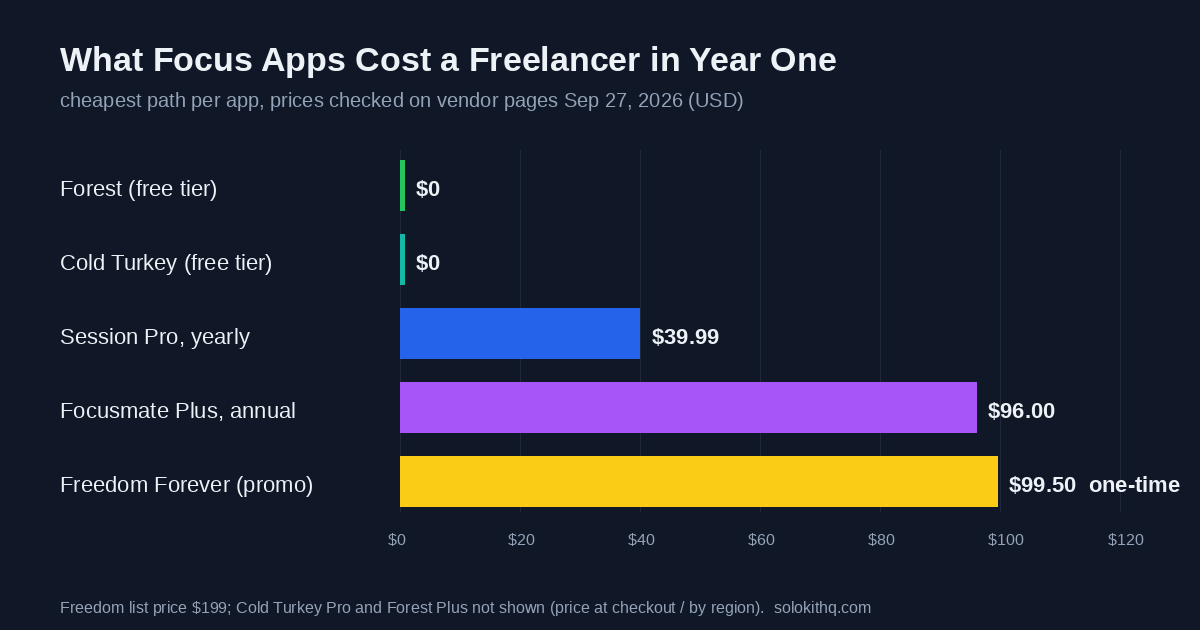
| Focusmate | Late start | 3 sessions per week, no card | Plus: $8/mo billed annually, or $12/mo monthly | Web (video sessions) |
| Freedom | Tab drift, across every device | Free tier with limited features | Forever: $99.50 one-time (50% promo; list $199). Monthly and yearly plans also offered | Mac, Windows, iOS, Android, Chromebook |
| Cold Turkey Blocker | Tab drift on a computer | Website blocking, timed blocks, statistics | Blocker Pro: one-time lifetime license (price shown at checkout) | Windows, macOS |
| Session | Lost thread | Unlimited sessions, 2 days of analytics | Pro: $4.99/mo or $39.99/yr | Mac, iPhone |
| Forest | Phone as the distraction | Timer, Deep Focus app blocking, Time Guard for 1 app or site | Plus: varies by region and store | iOS, Android, Chrome and Firefox extension |
Sources for the table: Focusmate pricing, Freedom Forever, Cold Turkey pricing, Session pricing and Forest’s plan comparison. Promotional prices change; Freedom’s 50% discount was live on the day we checked and may not be when you read this.
Get the free Freelancer Tool Stack
Picking by the problem, not the feature list
If you can’t start: Focusmate
Focusmate pairs you with another person for a live video work session; you each say what you plan to do, then work side by side until the session ends. It is the only app here that attacks the late start directly, because it replaces the missing boss with a scheduled appointment. The free plan’s three sessions a week is enough to learn whether it works for you: book them for the three mornings you most often waste.
It is the wrong fit if your problem shows up mid-afternoon rather than at the start of the day, or if you take a lot of client calls and a camera-on session feels like one more meeting. At $96 a year on the annual plan, it is also the most expensive recurring cost on this list, so only upgrade once three sessions a week clearly isn’t enough.
If you drift into tabs: Freedom or Cold Turkey
These two solve the same problem with a different philosophy. Cold Turkey is computer-only and strict: the Pro license adds app blocking, scheduled blocks and locking features, and one purchase covers every computer you personally use. Freedom syncs a block across your laptop and phone at the same time, which matters if your drift simply moves to the phone once the browser is locked.
The deciding question is whether your phone is part of the problem. If it isn’t, Cold Turkey’s free tier (website blocking with timed blocks) may be all you need, and the Pro upgrade is a single payment with a 30-day refund window. If it is, Freedom’s cross-device blocking is the reason to pay, and the Forever plan beats a subscription for anyone who expects to use it for more than a couple of years.
If you lose the thread: Session
Session is a Pomodoro timer built around the log. Each session carries an intention, Pro adds custom durations, a full history and website and app blocking on the Mac, and it can write finished sessions to Apple Calendar. That calendar record is the useful part for freelance work: it is a rough audit trail of where the week went, which helps the next estimate even if you bill by project.
It is Apple-only, so Windows and Android users should look elsewhere. And it is not a billing tool; if you invoice by the hour, your time tracker stays the source of truth, and Session is the thing that keeps the tracker honest.
If the phone is the problem: Forest
Forest grows a virtual tree during a focus session and kills it if you leave for another app. It sounds like a gimmick, but the free tier is unusually complete: the timer, Deep Focus app blocking and one scheduled Time Guard block cost nothing. Forest no longer sells its old one-time Pro unlock to new users; the current paid tier is a Plus subscription priced by region.
For freelancers the limit is the desktop: the browser extension helps, but the core of Forest is the phone. Use it alongside a computer blocker, not instead of one.
The client-emergency problem with hard blockers
Strict blockers were designed for students and writers, people with no one on the other end waiting for a reply. A freelancer’s inbox is partly a work channel. Lock yourself out of email for three hours on the day a client’s site goes down and the focus session costs you more than the distraction would have.
Three settings handle this without giving up the block:
- Block feeds, not channels. Put social sites and news on the blocklist and leave your client inbox and chat open. Most drift starts in the feeds anyway.
- Schedule blocks, don’t improvise them. A recurring block every morning from 9:00 to 11:30 is predictable, and you can tell clients when you reply. It pairs well with a time-blocking schedule with a buffer for client requests.
- Save locked modes for solo work. Freedom’s Locked Mode and Cold Turkey’s locking features are for writing days with no live projects, not for launch week.
What 25 minutes gets wrong for client work
The original technique, developed by Francesco Cirillo in the late 1980s and summarized on Wikipedia, uses 25-minute intervals, short breaks of 5 to 10 minutes, and a longer break after four rounds. It also treats each interval as indivisible: an interruption gets recorded and postponed, or the interval is abandoned.
That rule is the part worth keeping. The 25 minutes is not. Design, development and long-form writing often need more warm-up than that, and a timer ringing just as you reach the hard part is its own interruption. Two adjustments work better for most freelance tasks:
- Run longer intervals for deep work (50 or 60 minutes) and keep 25 for admin, email and invoicing, where short bursts suit the work.
- Keep the indivisible rule. When a client message arrives mid-session, write it down and answer at the break. That habit is closer to what made the fixed-interval group in the study above less tired than any particular app is.
Two stacks that cover most freelancers
The $0 stack. Focusmate free (three starts a week), Cold Turkey Blocker free on the computer, Forest free on the phone. It covers all three problems for no money, and it is where anyone should start for at least two weeks.
The paid stack, once you know what breaks. Upgrade only the tool that fixes the problem you still have. If late starts persist, Focusmate Plus. If drift survives the free blockers, Freedom Forever. If you can’t reconstruct your week, Session Pro at $39.99 a year. Paying for all three at once is how focus tools turn into another line on the software bill you are trying to keep small.
When an app is the wrong fix
If you already work steady hours with one or two retainer clients and ship on time, skip all of this; a kitchen timer does the job. If your lost hours come from too many client requests rather than distraction, no blocker helps, and the fix is in how you schedule and scope work. And if the browser extensions you already run are part of the noise, audit your Chrome extensions before adding another one.
More guides on planning and tracking the week are in the Time Tracking & Project Management section.
Get the free Freelancer Tool Stack
The 18 tools that run a one-person business — invoicing, contracts, time, AI writing, automation and money. One checklist, no fluff.