Say you sell a $29 template pack. On Gumroad’s own marketplace, about $8.70 of that goes to the platform. Through your own link, it is $3.40. On Lemon Squeezy it is $1.95, and on Sellfy the platform takes nothing per sale but you pay a monthly plan instead. Same product, same customer, and the amount you keep moves by almost $9 depending on where the checkout lives.
That spread is the real reason freelancers go looking for Gumroad alternatives. The feature lists are close to identical; the fee structure and who handles sales tax are not. Every figure below was read from the vendors’ own pricing pages on 14 October 2026, and where a page did not state something clearly, this article says so rather than guessing.
What Gumroad charges today
Gumroad’s pricing page shows two rates and no monthly fee. Sales that come through your profile or a direct link cost 10% plus $0.50 per transaction. Sales that arrive because a new customer found you in the Discover marketplace cost 30%. The page also says that, since 1 January 2025, Gumroad handles your tax obligations as a merchant of record in the regions where it has them, so coverage depends on where your buyers are.
The company dates to 2011, when Sahil Lavingia started it to sell a single icon directly to buyers, according to Wikipedia’s Gumroad entry. The 30% Discover rate is the part to read twice: if you send traffic from your own newsletter or social accounts, you want those buyers to arrive through a direct link, not through the marketplace.
What a $29 sale leaves you
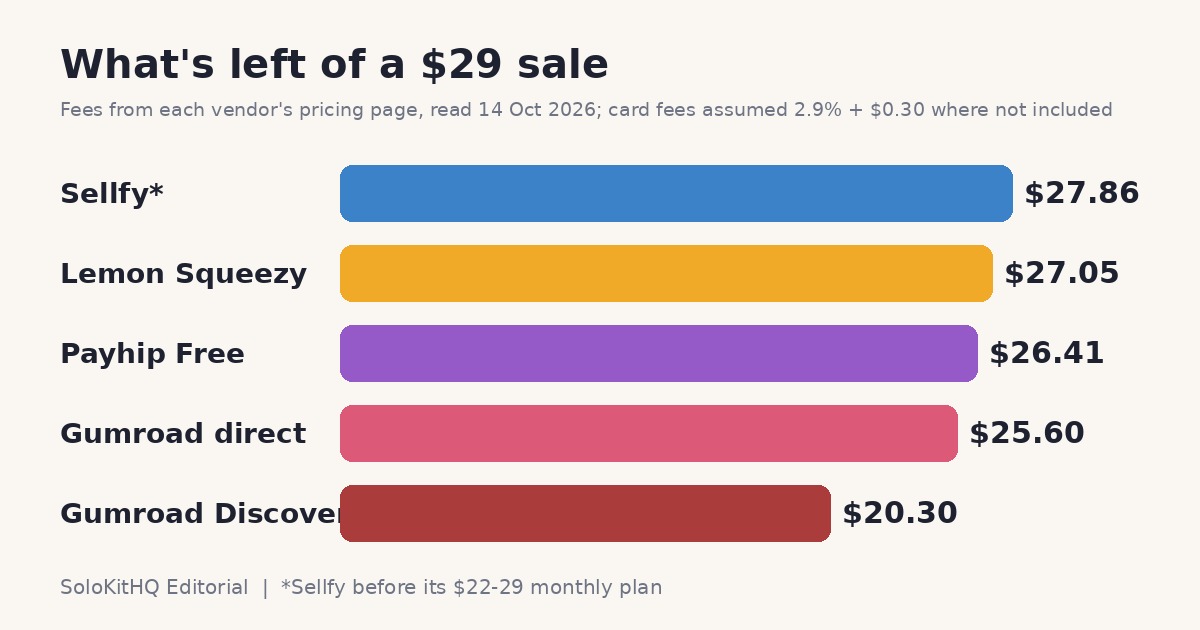
The table works through one sale price on each platform. The card-processing line is my own assumption of 2.9% plus $0.30, the rate Sellfy’s FAQ calls typical for Stripe and PayPal. Gumroad and Lemon Squeezy list one all-in fee and no separate processing line, so none is added there. Treat the result as an estimate for a US card sale, not a quote.
| Platform | Platform fee on $29 | Card fees added | You keep | Monthly cost |
|---|---|---|---|---|
| Gumroad (Discover) | $8.70 (30%) | None listed | $20.30 | $0 |
| Gumroad (direct link) | $3.40 (10% + $0.50) | None listed | $25.60 | $0 |
| Payhip Free | $1.45 (5%) | $1.14 (assumed) | $26.41 | $0 |
| Lemon Squeezy | $1.95 (5% + $0.50) | None listed | $27.05 | $0 |
| Sellfy | $0 (0%) | $1.14 (assumed) | $27.86 | $22 annual or $29 monthly (Starter) |
A fixed per-sale fee hurts low prices most. On a $9 download, Gumroad’s $0.50 alone is over 5% before the 10% is counted, so the cheaper your product, the more a flat-fee-free structure like Payhip’s percentage-only model helps.
Get the free Freelancer Tool Stack
Who collects the tax
Fees are the visible cost. The invisible one is VAT and sales tax. If you sell a PDF to a buyer in Germany from a home office in Texas, somebody has to charge, collect and remit that VAT, and a solo seller rarely wants it to be them.
Lemon Squeezy
The pricing page states it plainly: Lemon Squeezy is your merchant of record, takes on tax calculation and liability across jurisdictions, and files and pays on your behalf. The fee is 5% plus $0.50 per transaction, with a note that transactions outside the US may carry small additional fees. The page does not say how much, so budget a little extra for international buyers.
Payhip
Payhip’s pricing page says it collects and remits EU VAT and UK VAT automatically. It does not use the phrase “merchant of record” and does not state that it collects US sales tax, so check that part with an accountant before you rely on it. Plans are Free at 5% per sale, Plus at $29 a month with 2%, and Pro at $99 a month with no transaction fee. PayPal and Stripe fees come on top of all three.
Sellfy
Sellfy’s pricing page shows 0% transaction fees on every plan, with Stripe or PayPal charging their own rates on top. I could not find a statement there about who handles VAT, so I am not claiming one. If tax handling matters to you, ask their support in writing before you move your store.
When a monthly plan beats a percentage
Flat plans only win once you sell enough. Using the $29 example, Sellfy’s $22-a-month annual rate saves about $0.81 per sale against Lemon Squeezy, so you need roughly 28 sales a month before it pays for itself. On Sellfy’s $29 monthly billing it is closer to 36. Sellfy’s Starter plan also caps sales at $10,000 a year, per its pricing page, so a store that grows past that is pushed to the $59 tier.
Payhip works the same way. Moving from Free to Plus at $29 a month cuts the platform fee from $1.45 to $0.58 on each $29 sale, so it breaks even near 34 sales a month. Below that, staying on Free and paying only on what you sell is the cheaper move. If you are still validating a product, a percentage fee is insurance: you pay nothing in a month with no sales.
Getting paid from abroad
Payout method matters if you work across borders. Gumroad says its payout method varies by country, between direct deposit and PayPal, and Lemon Squeezy pays twice a month by bank wire or PayPal. If most of your income lands in a foreign-currency account, the conversion cost can rival the platform fee, which is the same problem covered in Wise vs Payoneer: What a $2,000 Client Payment Actually Costs You.
Picking by situation
Match the platform to the shape of your store, not to a ranking.
Selling a handful of low-priced templates, with unpredictable months: Payhip Free or Gumroad through direct links, since you only pay when something sells. Pushing most buyers from your own audience: avoid Gumroad Discover entirely and send people to the direct link. Selling internationally and wanting someone else to carry the tax filing: Lemon Squeezy is the one whose page states that outright. Past roughly 30 sales a month at a steady price: run the break-even above for Sellfy or Payhip Plus, because the flat fee starts to pay.
Whichever you pick, count the platform fee as a cost of the product when you set its price. The same logic sits behind How Much You Really Need to Earn Freelancing vs. a Salary, and a digital product is one of the cheapest items to add to the stack in The Cheapest Freelance Software Stack Under $30 a Month. For more on the money side of running solo, browse the Freelance Business & Money category.
Moving an existing store
Export your customer list and product files first, then rebuild one product on the new platform and buy it yourself to test the checkout, the receipt and the download email. Keep the old store live until the new one has completed a real sale. Do not point a custom domain over until you have confirmed the new platform can issue the same license keys or download links your past buyers received.
Get the free Freelancer Tool Stack
The 18 tools that run a one-person business — invoicing, contracts, time, AI writing, automation and money. One checklist, no fluff.