Mailchimp’s free plan now stops at 250 contacts and 500 sends a month, with a hard cap of 250 a day. If your client list, past leads and newsletter readers add up to 300 people, the free plan is already too small before you have written a single email. That one number is why so many freelancers start searching for an alternative, and why this comparison is built around what happens when the list grows, not around feature checklists.
Every limit and price below was read from the vendors’ own pricing pages on 13 October 2026. Those pages change often, so use the links to confirm before you commit. Where a page did not state a number clearly, the table says so instead of guessing.
What Mailchimp’s free plan covers today
Mailchimp’s pricing page lists the Free plan at 250 contacts, a maximum of 500 sends per month or 250 per day, no marketing automation flows, and Mailchimp branding that stays on your emails. The first paid tier, Essentials, is shown at $13 a month for the first 12 months, and Standard at $20 a month for 12 months with up to 6,000 emails each month. The page does not say what the price becomes after the promotional period, so budget for it to rise.
Some context helps explain the shape of the plan. Mailchimp started in 2001 as a paid email service and added a free tier in 2009; Intuit completed its acquisition in November 2021, according to Wikipedia’s Mailchimp entry. The product has since grown toward a full marketing platform, which is more than a one-person business sending a monthly note usually needs.
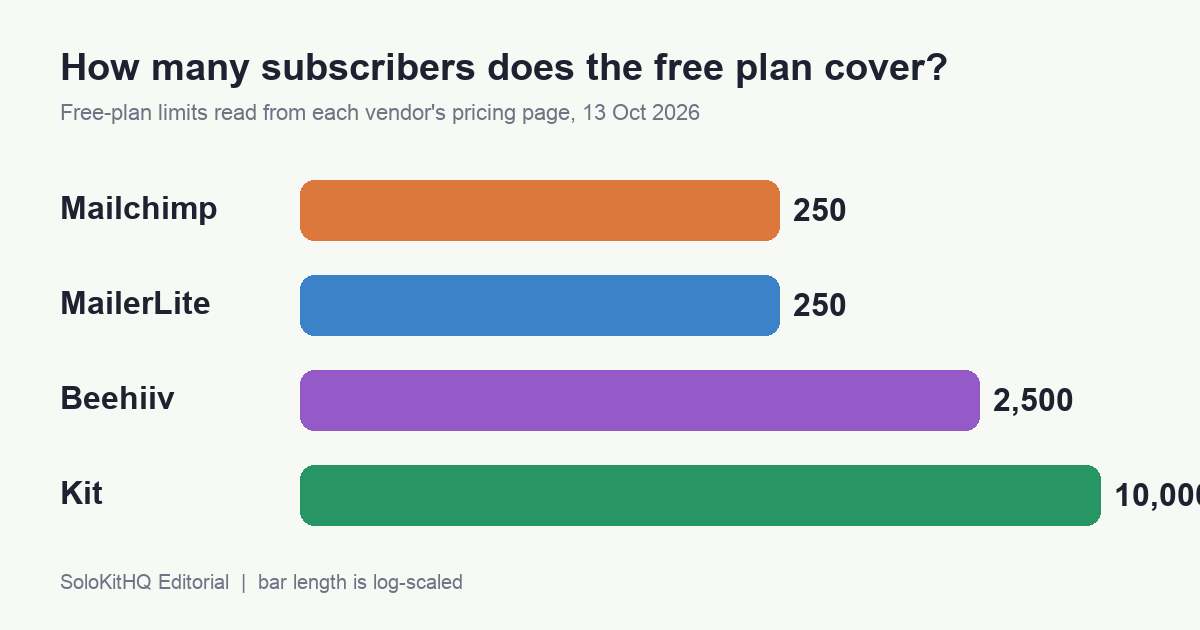
Free plans side by side
| Tool | Free-plan list size | Free-plan sending | Automations and extras | Branding on emails |
|---|---|---|---|---|
| Mailchimp | 250 contacts | 500 a month, 250 a day | No automation flows | Stays on free |
| MailerLite | 250 subscribers | 2,500 a month | 3 automations, 1 website, 1 landing page | Page lists logo removal only on paid Comfort |
| Kit | Up to 10,000 subscribers | Unlimited broadcasts | Unlimited forms and landing pages, tagging, sell digital products | Not stated on the page |
| Beehiiv | Up to 2,500 subscribers | Unlimited sends | Newsletter publishing focus | Beehiiv branding stays on free |
| Brevo | Contact cap not stated | Up to 300 emails a day after account approval | Email plus basic marketing tools | Logo removal listed under Starter |
Sources: Mailchimp, MailerLite, Kit, Beehiiv and Brevo, read 13 October 2026.
Who each alternative suits
Kit: the free plan that keeps up with a growing list
Kit (formerly ConvertKit) is the only option here where the free plan stretches to 10,000 subscribers while still allowing unlimited broadcasts, forms and landing pages. It also lets you sell digital products and subscriptions on the free tier, which matters if a template pack or a short course is on your roadmap. The catch is the jump: the Creator plan for 1,000 subscribers is listed at $33 a month, or $390 billed yearly. That is the price of the features that matter to many solo senders, so decide early whether you will need them.
MailerLite: cheap to start paying
MailerLite’s free plan is as small as Mailchimp’s on subscribers (250) but far more generous on sending, at 2,500 emails a month, plus three automations and a landing page. Its paid entry, Comfort, starts at $12 a month according to the pricing FAQ, and that is where logo removal appears. Choose it when your list will sit in the hundreds and you want to pay a small, predictable amount rather than stay on free.
Beehiiv: for a newsletter that is the product
Beehiiv is built around publishing a newsletter, and its free plan allows up to 2,500 subscribers with unlimited sends. Its branding stays on free emails, and removing it is a paid feature. The pricing page did not show a plan I could confirm for a monthly comparison, so I have left its paid price out rather than quote a number I could not verify. It makes sense if you plan to grow an audience of readers; it is a poor fit for sending project updates to a few dozen clients.
Brevo: when you send in bursts
Brevo’s free plan is limited by a daily cap of 300 emails after approval rather than by a visible contact limit, which suits occasional campaigns to a list you already own. The page did not show the Starter price in the text I could read, so check the live page for it. Its identity is as a mixed email and transactional tool, which is useful if your site also needs order or booking confirmations.
Get the free Freelancer Tool Stack
A worked example: the 300-person list
This is a calculation, not a test I ran. Imagine a freelancer with 300 people: 120 past clients, 130 leads who downloaded something, and 50 colleagues who asked to hear about new work. They send one email a month. Using the pages above:
| Tool | Fits on free? | What the freelancer does next |
|---|---|---|
| Mailchimp | No, 250-contact cap | Pay from $13 a month (first 12 months), or trim 50 people |
| MailerLite | No, 250-subscriber cap | Move to Comfort, from $12 a month |
| Beehiiv | Yes, up to 2,500 | Stay free, accept Beehiiv branding |
| Kit | Yes, up to 10,000 | Stay free until paid features are needed |
On those numbers, a list of 300 pays nothing on Kit or Beehiiv and roughly $12 to $13 a month elsewhere. Over a year that is under $160, which is small money. The real cost is the migration you do later if you pick wrong, so the choice should follow where your list is going, not where it is today.
Moving your list without losing trust
Switching platforms is mostly an export and a confirmation. Export your audience as a CSV from Mailchimp, including tags and the date each person subscribed. Import it to the new tool, keep the subscribed status, and send a short note explaining the change so nobody is surprised by a new sender name. If some contacts never gave clear consent, use the move to ask them again with a double opt-in instead of carrying them over silently. A smaller, willing list usually performs better than a larger, tired one.
Plan the automation rebuild separately. Mailchimp’s free plan does not include automation flows, so there is nothing to port if you were on free. If you used paid automations, rebuild the welcome email first, since it is the one that sends the most often. The freelance email templates guide has wording you can reuse for the first message.
Pairing the tool with the rest of your stack
Email software works best when it is fed automatically. A form on your site, a new-client onboarding step or a finished project can add a contact without you touching it, and the walkthrough in 12 Zapier automations for freelancers shows which of those run on the free tier. If cost is the main driver, the list in the cheapest freelance software stack under $30 a month shows where an email tool fits in a small budget. And if you are collecting emails from new clients as part of a handover, the client onboarding process is a natural place to ask for permission to send updates.
Where to start this week
Count your list honestly, then decide whether it will double in the next year. If it will stay under 250 and you only send occasional updates, MailerLite’s free or Comfort plan is the lowest-friction move. If you expect the list to grow and want landing pages and product sales in one place, start on Kit’s free plan. If the newsletter itself is what you sell, try Beehiiv. Whichever you choose, export your Mailchimp list first, because that file is the only part of this switch you cannot recreate.
More on the tools around this decision lives in the Freelance Business & Money section.
Get the free Freelancer Tool Stack
The 18 tools that run a one-person business — invoicing, contracts, time, AI writing, automation and money. One checklist, no fluff.